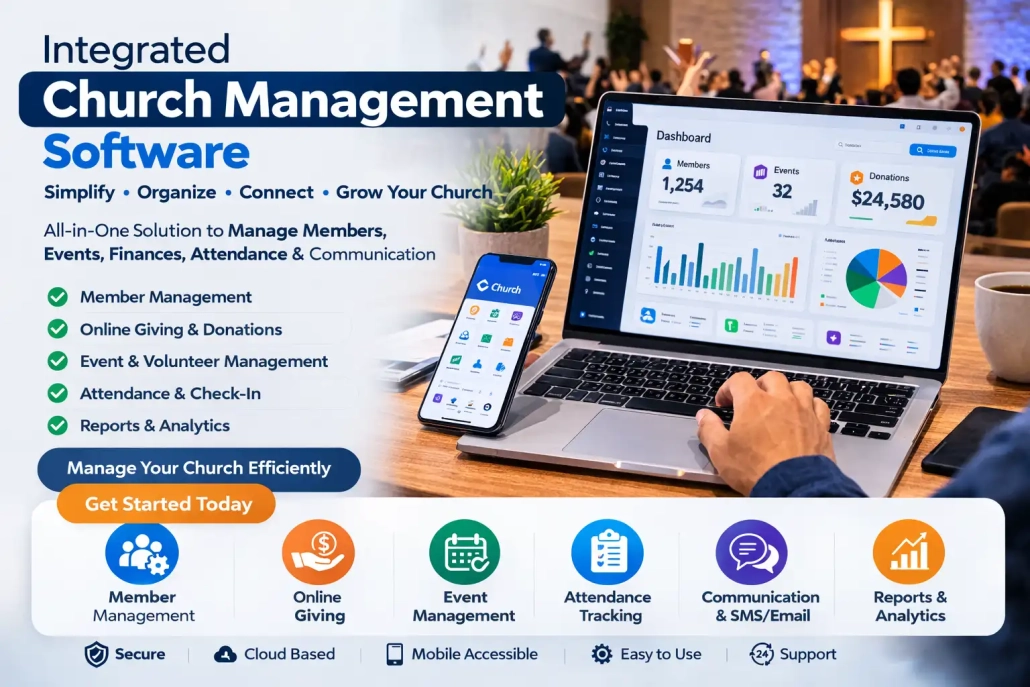
Church Administration System: Best Software for Church Management & Growth

Church Administration System
Church Administration System: The Complete Guide to Streamlining Ministry Operations
In today’s fast-paced digital world, churches are no longer relying solely on manual processes to manage their operations. A church administration system has become an essential tool for modern ministries seeking efficiency, transparency, and growth. Whether you lead a small congregation or a large multi-campus church, implementing the right system can transform how you manage members, finances, communication, and events.
This comprehensive guide explores everything you need to know about church administration systems, their benefits, features, and how to choose the right one for your ministry.
What is a Church Administration System?
A church administration system is a software solution designed to help churches manage their daily operations effectively. It centralizes administrative tasks such as membership management, financial tracking, communication, scheduling, and reporting into one unified platform.
Instead of juggling spreadsheets, paper records, and disconnected tools, churches can streamline their workflows and focus more on their core mission—serving their community and growing spiritually.
Why Churches Need an Administration System
Managing a church involves much more than Sunday services. Administrative responsibilities can quickly become overwhelming without proper tools. Here’s why adopting a church administration system is crucial:
1. Improved Organization
Manual record-keeping often leads to errors and inefficiencies. A centralized system ensures all data is organized, searchable, and easily accessible.
2. Time Efficiency
Automating repetitive tasks such as attendance tracking, event scheduling, and communication frees up valuable time for ministry work.
3. Better Communication
A church administration system allows leaders to send emails, SMS, and notifications to members instantly, ensuring everyone stays informed.
4. Financial Transparency
Tracking tithes, offerings, and expenses becomes easier and more accurate, promoting accountability and trust within the congregation.
5. Data-Driven Decisions
With built-in analytics and reports, church leaders can make informed decisions based on real data.
Key Features of a Church Administration System
When evaluating a church administration system, it’s important to understand the core features that make it effective.
1. Membership Management
This feature allows churches to store detailed information about members, including:
-
Contact details
-
Family relationships
-
Attendance history
-
Spiritual milestones
Having a comprehensive member database helps leaders provide personalized care and engagement.
2. Attendance Tracking
Tracking attendance for services, events, and small groups helps identify trends and engagement levels within the church.
3. Financial Management
A robust system includes tools for:
-
Recording tithes and offerings
-
Budgeting and expense tracking
-
Generating financial reports
-
Online giving integration
4. Event and Calendar Management
Churches host numerous events, from services to conferences. A centralized calendar helps:
-
Schedule events
-
Assign volunteers
-
Avoid conflicts
5. Communication Tools
Effective communication is vital. Systems often include:
-
Bulk SMS and email messaging
-
Push notifications
-
Group communication features
6. Volunteer Management
Organizing volunteers becomes easier with tools that allow:
-
Role assignment
-
Scheduling
-
Tracking participation
7. Reporting and Analytics
Detailed reports provide insights into:
-
Membership growth
-
Attendance trends
-
Financial performance
Benefits of Using a Church Administration System
Implementing a church administration system offers numerous advantages that go beyond basic organization.
Enhanced Member Engagement
With accurate data and communication tools, churches can connect more effectively with members, increasing participation and involvement.
Reduced Administrative Burden
Automation minimizes manual work, allowing staff and volunteers to focus on ministry rather than paperwork.
Increased Accuracy
Digital systems reduce human errors in record-keeping, ensuring reliable data.
Scalability
As your church grows, the system can scale with your needs, accommodating more members and activities.
Accessibility
Many systems are cloud-based, allowing access from anywhere, whether in the office or on the go.
How to Choose the Right Church Administration System
Selecting the right system is a critical decision. Here are key factors to consider:
1. Ease of Use
The system should be user-friendly, especially for staff and volunteers who may not be tech-savvy.
2. Customization
Every church is unique. Look for software that allows customization to fit your specific needs.
3. Integration Capabilities
Ensure the system can integrate with other tools such as accounting software, email platforms, and payment gateways.
4. Security
Protecting member data is essential. Choose a system with strong security features and data protection measures.
5. Cost
Consider your budget and evaluate whether the system provides value for money. Some platforms offer tiered pricing based on features.
6. Customer Support
Reliable support is crucial, especially during implementation and troubleshooting.
Cloud-Based vs On-Premise Church Administration Systems
When choosing a church administration system, you’ll need to decide between cloud-based and on-premise solutions.
Cloud-Based Systems
Advantages:
-
Accessible from anywhere
-
Automatic updates
-
Lower upfront costs
Disadvantages:
-
Requires internet access
-
Subscription-based pricing
On-Premise Systems
Advantages:
-
Full control over data
-
No recurring subscription fees
Disadvantages:
-
Higher upfront costs
-
Requires maintenance and IT support
For most modern churches, cloud-based solutions are the preferred choice due to their flexibility and ease of use.
Implementation Best Practices
Successfully implementing a church administration system requires careful planning.
1. Define Your Needs
Identify the specific challenges you want the system to solve.
2. Train Your Team
Provide adequate training to ensure staff and volunteers can use the system effectively.
3. Migrate Data Carefully
Ensure existing records are accurately transferred into the new system.
4. Start Small
Begin with core features and gradually expand usage.
5. Monitor and Improve
Continuously evaluate the system’s performance and make adjustments as needed.
Common Challenges and How to Overcome Them
Resistance to Change
Some members or staff may be hesitant to adopt new technology. Address this by:
-
Providing training
-
Demonstrating benefits
-
Offering ongoing support
Data Migration Issues
Transferring data can be complex. Ensure proper backups and verification processes.
Cost Concerns
Start with essential features and scale up as your church grows.
Future Trends in Church Administration Systems
Technology continues to evolve, and church administration systems are no exception.
Mobile Accessibility
More systems are offering mobile apps for on-the-go management.
Automation and AI
Automation tools are improving efficiency, while AI can provide deeper insights into member engagement.
Online Giving Expansion
Digital payment options are becoming more diverse and convenient.
Integration with Social Media
Churches can connect their administration systems with social platforms to enhance outreach.
Conclusion
A church administration system is no longer a luxury—it’s a necessity for churches aiming to operate efficiently and grow sustainably. By centralizing administrative tasks, improving communication, and providing valuable insights, these systems empower church leaders to focus on what truly matters: ministry and community impact.
Choosing the right system requires careful consideration of your church’s needs, budget, and long-term goals. With the right solution in place, your church can streamline operations, enhance member engagement, and position itself for future growth.

